


CPU: The Heart of Your VPS
Think of the CPU as the engine of a car. You wouldn’t expect a tiny hatchback to tow a trailer full of bricks, right? Similarly, your VPS needs the right processor speed and core count for the workload. A single high-frequency core can outperform multiple low-frequency cores when it comes to handling a few complex tasks like WordPress or eCommerce transactions.
📌 IMPORTANT: For web applications that require fast response times, prioritize CPU speed over sheer core count. A 3.5 GHz core may serve you better than four 2.0 GHz cores.
Practical example: imagine you’re hosting a small online store. Your customers are clicking “Add to Cart,” and your server has to process payments, load images, and update inventory—all at the same time. Without a strong CPU, everything slows down, and sales might literally slip through your fingers.
RAM: The Workspace for Tasks
RAM is your server’s short-term memory. The more you have, the more tasks can run simultaneously without slowing down. Simple websites or personal blogs may run fine with 2–4 GB, but for heavier setups—like multi-plugin WordPress sites, CRM systems, or game servers—8 GB or more is recommended.
✅ USEFUL: Imagine trying to bake a layered cake in a tiny kitchen with only one countertop. That’s your VPS with insufficient RAM—tasks pile up, performance drops, and frustration grows.
Have you ever noticed your computer slowing down when too many apps are open? The same happens on a VPS. Each additional plugin, script, or database query consumes memory. Don’t underestimate the impact of RAM—it’s the workspace where all actions happen.
SSD: The Speedy Storage
If CPU is the engine and RAM is the workspace, SSD is the highway. Traditional HDDs are like dirt roads—bumpy and slow. NVMe SSDs are superhighways, letting your server read and write data almost instantly. Databases, caching, and file-heavy sites benefit the most.
💡 TIP: Always choose a VPS with SSD storage for faster load times. Even a small blog feels snappier, and a busy eCommerce store can handle hundreds of simultaneous users without stalling.
Life example: if you’ve ever waited for a slow file to open on your personal laptop, you know the frustration. Now imagine dozens of users trying to access your website simultaneously—that’s why SSD storage matters.
Quick Comparison Table: CPU, RAM, and SSD
| Resource | Role | Practical Tip |
| CPU | Processes tasks, runs applications | Prioritize high GHz for dynamic websites |
| RAM | Temporary workspace for tasks | 8 GB+ for multi-plugin or database-heavy sites |
| SSD | Fast storage for files and database queries | Always prefer NVMe SSD for responsiveness |
Real-Life Scenarios
Let’s dive into some real-world situations where the choice of VPS resources can make or break your online experience. These aren’t abstract numbers; these are moments that affect actual users, real revenue, and your peace of mind. Imagine this as if you’re watching a small drama unfold with your server as the main character.
Scenario 1: Hosting a WordPress Site with Multiple Plugins
Picture this: you’ve built a sleek WordPress website loaded with plugins for SEO, analytics, forms, and fancy sliders. Everything looks great on paper. But then, your VPS has a low-frequency CPU and barely 2 GB of RAM. Result? Pages take forever to load, images pop in seconds late, and visitors start bouncing before they even see your content. Frustration rises, your bounce rate skyrockets, and conversions drop. It’s like inviting friends to a dinner and realizing the oven can’t cook fast enough — everyone leaves hungry. Here, a high-frequency CPU and sufficient RAM are not optional; they are your website’s survival kit.
Scenario 2: Running a Small Game Server for Friends
Imagine hosting a Minecraft or Valheim server for your friends. You’ve set up worlds, quests, and mods. But without SSD storage, every action — jumping, mining, or opening an inventory — is delayed. The difference between smooth gameplay and lag-induced rage quits is literally the type of storage your VPS offers. HDD-based VPS? Expect frequent complaints and lost excitement. NVMe SSD? Your server runs like a well-oiled sports car, fast, responsive, and exhilarating. It’s like comparing a bicycle to a racing car on a downhill track — one is fun, the other makes hearts race.
Scenario 3: E-commerce Store During a Flash Sale
Now, picture your online shop during a limited-time flash sale. Hundreds of eager shoppers click “Buy Now” simultaneously. If your VPS is underpowered — low CPU cores and insufficient RAM — orders may fail, payment gateways hang, and your customers leave frustrated. Every second of downtime is lost revenue, trust, and potentially repeat business. But with the right CPU frequency and ample RAM, your orders process seamlessly, carts update instantly, and customers leave happy. It’s like running a bakery on Black Friday: you need enough ovens and staff to keep the line moving, or chaos ensues.
These scenarios highlight a simple truth: VPS resources are not just numbers on a spec sheet. They translate directly to user experience, business performance, and even your reputation. Choosing wisely is not optional; it’s essential.
Sometimes it’s surprising how often people ignore these three resources. They sign up for a VPS based on price alone, then spend hours troubleshooting why their site lags. Don’t be that person—plan ahead and invest a little more upfront to avoid headaches later.
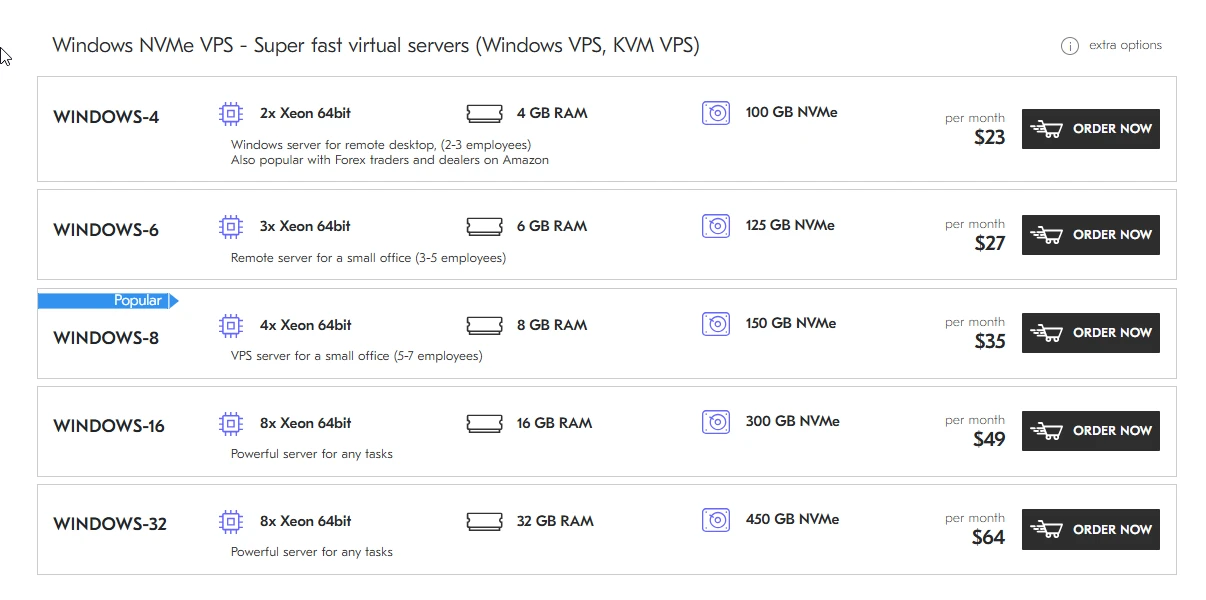
Windows NVMe VPS – Super fast virtual servers (Windows VPS, KVM VPS)
📌 IMPORTANT: CPU, RAM, and SSD work together. Neglect any of these, and the server performance will suffer, regardless of what fancy marketing terms the hosting provider uses.
In short, choosing the right VPS is like preparing for a road trip: you need a reliable engine (CPU), enough luggage space (RAM), and smooth highways (SSD). Get these three right, and your digital journey will be fast, smooth, and frustration-free.
💡 TIP: Always check benchmarks, consider your real workload, and don’t skimp on resources. Your website’s visitors—and your peace of mind—will thank you.
So, are you ready to choose a VPS that actually performs? Don’t let price tags or marketing jargon decide for you. Look at CPU, RAM, and SSD carefully – https://deltahost.com/, match them to your needs, and watch your projects run like a dream.